
Payment Widget
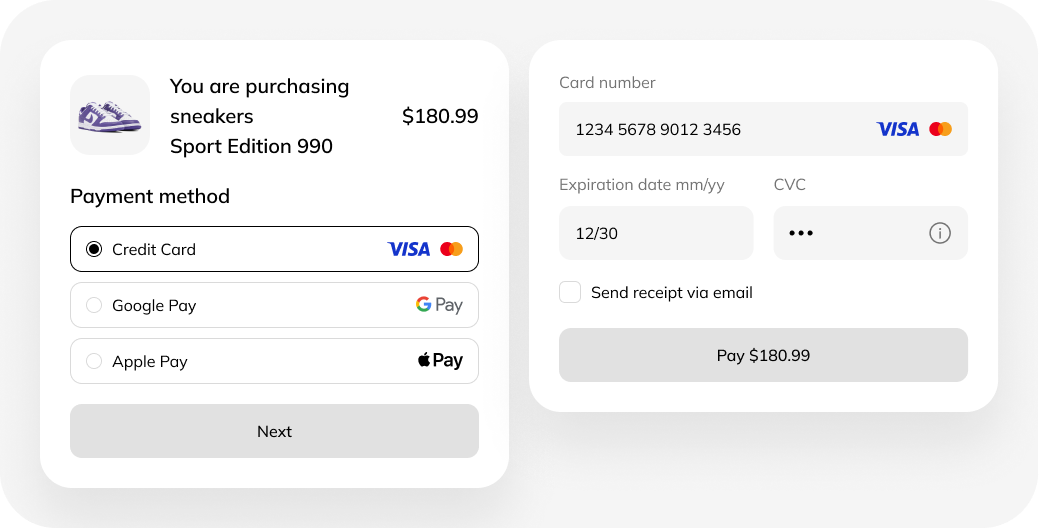
How the payment widget works
The payment widget is a modern solution for accepting online payments that combines easy integration with broad functionality. Let’s look at its key features.
Universal integration
The widget is easy to embed into any website or mobile app. Its adaptive design ensures correct display:
- in all popular browsers;
- on any devices (PCs, smartphones, tablets).
Seamless payment flow
Seamless payment flow. The main advantage is the absence of redirects. Buyers complete the transaction directly on your resource without switching to third-party pages. This shortens the path to purchase and increases conversion.
Single payment hub
The widget supports all current payment methods:
- bank cards (Visa, Mastercard, Mir, etc.) — automatically detects the type of payment system and issuing bank;
- pay services — allowing customers to pay for purchases in one click.
Sales growth and automation
The CloudPayments solution helps to:
- encourage impulse purchases thanks to a convenient interface;
- implement recurring payments (subscriptions) without complex technical changes;
- centrally manage all types of transactions.
Intelligent data validation
The widget ensures payment security and transparency:
- checks the correctness of entered card data in real time;
- when an error occurs, clearly indicates the reason (for example, insufficient funds or an expired card);
- allows you to quickly contact the customer to resolve the issue and retry payment.
Which businesses it suits
The tool is universal and effective for:
- online stores;
- service businesses;
- subscription-based projects.
Key benefits:
- transaction protection;
- automatic verification of payment data;
- a variety of payment methods;
- improved user experience;
- higher conversion due to a simplified purchase process.
How to connect the payment widget
To connect, simply click the “Connect” button and get in touch with us — we’ll explain all the details and guide you through the process.